
How to Search Company Websites for Job Openings
On this page
TL;DR: Company websites post jobs before job boards do. By going directly to the source, you can apply earlier, face less competition, and get a better read on the company culture before your first interview. Learn how to find jobs on company websites, search ATS platforms, use Google search operators, set alerts, and apply before jobs reach LinkedIn.
Why Company Career Pages Beat Job Boards
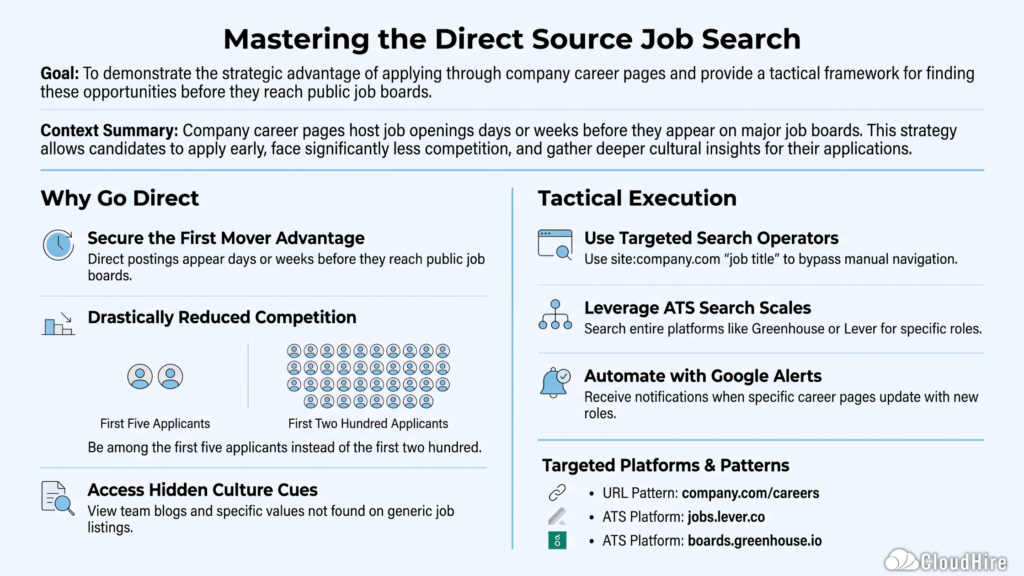
When a company creates a new role, the job description doesn’t go up everywhere at once. It usually starts on the company’s own careers page or applicant tracking system (ATS). Days, sometimes weeks later, it gets pushed out to LinkedIn, Indeed, or Naukri.
That delay matters. By the time you see a posting on a job board, it might already have 200 applicants. If you find it directly on the company site on day one, you might be in the first five.
There’s another reason to go direct: Career pages tell you things job boards don’t. The language a company uses to describe roles, the team structure they show, the values they list, the benefits they highlight, all of this gives you material for a better application and a more prepared interview.
Step 1: Know Where to Look on a Company Website
Every company has a careers section, but it’s not always easy to find. Here’s how to get there fast.
Common URL patterns to try directly in your browser:
| Pattern | Example |
|---|---|
| /careers | company.com/careers |
| /jobs | company.com/jobs |
| /join-us | company.com/join-us |
| /work-with-us | company.com/work-with-us |
| /about/careers | company.com/about/careers |
If none of those work, go to Google and search: site:companyname.com careers or site:companyname.com jobs. This usually pulls up the right page instantly.
Step 2: Identify Which ATS They Use
Most companies don’t host their jobs in-house. They use an applicant tracking system (ATS), and knowing which one helps you search smarter.
| ATS Platform | What to Look For |
|---|---|
| Greenhouse | URLs with greenhouse.io or boards.greenhouse.io |
| Lever | URLs with jobs.lever.co |
| Workday | URLs with myworkdaysite.com or a Workday portal link |
| BambooHR | URLs with bamboohr.com |
| Taleo | Often embedded within the company’s own domain |
| iCIMS | URLs with icims.com |
Why does this matter? Because you can search across all companies using a specific ATS. For example, if you go to boards.greenhouse.io and use a site-specific Google search like site:boards.greenhouse.io “product manager” “remote”, you can find roles across dozens of companies at once without visiting each page individually.
One thing to keep in mind: ATS platforms only help you find jobs that have already been published. Some recruiters search verified talent platforms before a role is posted publicly, reaching out to qualified candidates directly instead of waiting for applications. That’s another reason to keep a complete, searchable candidate profile alongside checking company career pages.
Step 3: Use Google to Search Company Career Pages at Scale
This is the most time-efficient method for searching multiple company websites for job openings at once.
Google search operator: site:companyname.com “job title”
For example:
- site:stripe.com “data analyst”
- site:zomato.com “growth marketing”
- site:infosys.com “cloud engineer”
You can also search across an ATS:
- site:lever.co “UX designer” “Bangalore”
- site:greenhouse.io “content strategist” “remote”
This approach surfaces jobs that don’t always rank well in generic job board searches, and it lets you find job openings on company websites without clicking through each one manually.
Step 4: Set Up Alerts So You Never Miss a Posting
Checking career pages manually every day is not sustainable. The smarter move is to automate it.
Google Alerts: Go to google.com/alerts and set up an alert for site:companyname.com/careers new opening. It’s free and sends you an email when the page is updated.
Job board alerts with source filtering: On LinkedIn and Indeed, you can filter results by “Easy Apply off” or sort by “Date posted: last 24 hours” to surface direct company postings faster.
ATS bookmark folders: Create a bookmark folder in your browser with the direct careers URLs of your top 10–15 target companies. Checking all of them takes under 10 minutes.
Step 5: Read the Career Page Like a Research Document
Most candidates use a company’s career page only to find the job description. That’s leaving a lot on the table.
Before you apply, look for:
- Team pages: See who you would potentially be working with. Look them up on LinkedIn.
- Engineering or product blogs: Especially useful in tech. These show what problems the team is solving right now, which is gold for your cover letter or application note.
- Glassdoor link or employee reviews section: Some companies link to their own culture pages or employee stories. These reveal the real working environment, not just the polished version.
- Benefits listed on the careers page: Know before you apply whether remote or hybrid is offered, what their leave policy looks like, and whether stock options are on the table.
- Job description language: If the description uses terms like “move fast,” “high ownership,” and “scrappy,” that’s a signal about pace and culture. If it says “collaborative,” “process-oriented,” and “cross-functional,” that’s a different environment. Neither is wrong, but knowing which you’re walking into helps.
Tracking Your Applications: A Simple System
When you’re checking multiple company websites regularly, things can get disorganized fast. A simple tracker keeps you in control.
| Company | Role | Date Found | Date Applied | ATS | Follow-up Date | Status |
|---|---|---|---|---|---|---|
| Example Co | Growth Marketer | Jun 25 | Jun 26 | Greenhouse | Jul 3 | Applied |
| Another Co | Content Lead | Jun 28 | Jun 29 | Lever | Jul 6 | Interview scheduled |
Keep this as a spreadsheet. It takes two minutes to update and saves you from losing track of where you are in each process.
| Method | Best For |
| Company career pages | Finding newly posted jobs before they reach job boards |
| ATS search operators | Searching openings across multiple companies |
| Verified talent platforms | Being discovered by recruiters before jobs are publicly posted |
Frequently Asked Questions
Is it better to apply directly on a company’s website or through LinkedIn?
Applying directly on the company careers page is almost always better. You skip the LinkedIn middleman, your application goes straight into their ATS, and you often apply before the role gets crowded on public platforms.
What if a company doesn’t have any jobs posted?
That doesn’t mean they aren’t hiring. Many companies, especially smaller ones, hire reactively. Send a short, well-researched speculative application through their contact page or to a relevant team leader. It costs nothing and occasionally leads directly to a conversation.
How do I find the careers page for a company that doesn’t have one?
If a company has no formal careers page, they often post on their LinkedIn company page under the “Jobs” tab. You can also search for their company name + “hiring” or “we’re hiring” on LinkedIn.
What is an ATS and why does it matter?
An applicant tracking system (ATS) is software companies use to collect, filter, and manage job applications. Understanding which ATS a company uses helps you format your application correctly, use the right keywords, and sometimes find roles that aren’t visible through a standard job board search.
How often should I check company career pages?
For your top five target companies, check once or twice a week. For the rest of your list, set up Google Alerts or bookmark them and do a weekly pass. Daily checking of more than five sites becomes counterproductive quickly.
The Part That Most Job Search Guides Skip
Searching company websites is a great strategy. But there’s a layer that works even better than finding the job post first: being on a recruiter’s radar before the post goes live.
Recruiters who are filling a role often search candidate databases and platforms before the job is even approved for public posting. If your profile is discoverable and clearly communicates your skills, you might get contacted before the role is ever listed anywhere.
CloudHire gives you a candidate profile that works this way. Recruiters actively use it to find and screen candidates for roles that haven’t been posted yet. Instead of refreshing career pages waiting for something to appear, your profile is doing the work for you in the background.
Build your Cloud ID and get discovered by recruiters before the job goes live →
Put your job search on autopilot
CloudHire Smart Apply tailors your resume and applies to matching roles for you — so you spend your time interviewing, not scrolling.