The short answer:
You find recruiters on LinkedIn by making your profile searchable, using recruiter-specific search logic, engaging where recruiters signal hiring intent, and reaching out with value instead of requests.
Most people fail not because recruiters aren’t there but because they approach LinkedIn like a directory instead of a system.
This guide breaks down how to find recruiters on LinkedIn in a way that actually leads to responses, conversations, and opportunities, not ignored connection requests.
Step 1: Make Your Profile Recruiter-Readable Before You Start Searching
Recruiters don’t “discover” people randomly. They respond to signals.
Before you look outward to finding recruiters on LinkedIn, your profile must communicate relevance in seconds. Let’s see: how to let recruiters find you on LinkedIn
What recruiters scan first (and why it matters)
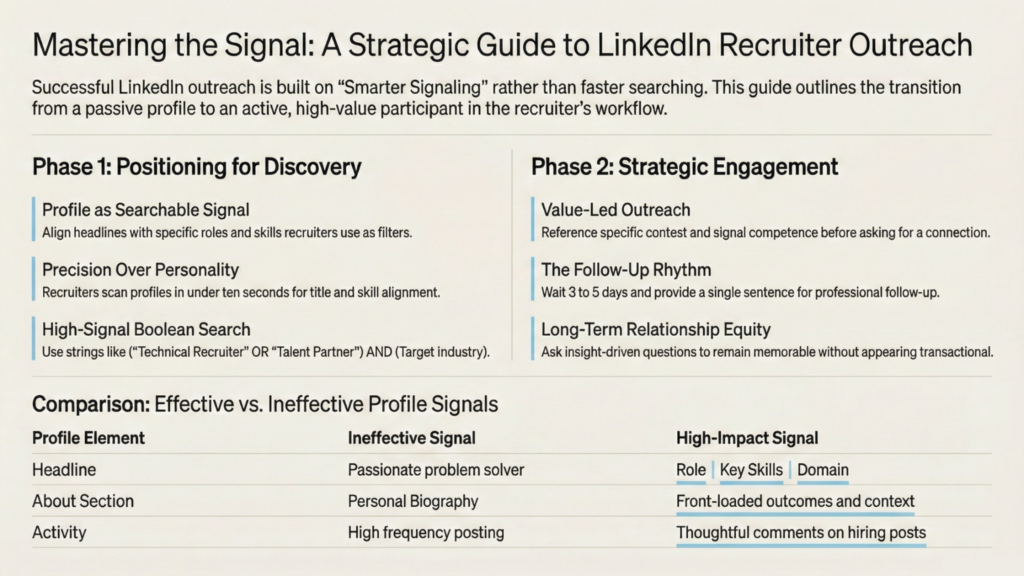
- Headline = positioning, not personality
Recruiters search by role, skills, and domain.
A headline like:
“Backend Engineer | Real-Time APIs | AWS Lambda”
works because it matches how recruiters filter talent. - About section = value summary, not biography
Front-load outcomes and context.
Compare:
- “Passionate problem solver with strong skills”
- “3+ years scaling high-traffic APIs; reduced latency by 40% in production systems”
- “Passionate problem solver with strong skills”
- Activity = proof of thinking, not posting frequency
Occasional posts or comments on industry topics signal credibility.
Recruiters notice people who explain problems, not promote themselves.
How to Stay Visible Without Posting Constantly
Visibility on LinkedIn isn’t built through volume; it’s built through relevance. Recruiters don’t need you to be a content creator. They need occasional signals that you’re active, informed, and engaged in your field.
Thoughtful comments on hiring posts, industry conversations, or technical discussions are often more powerful than original posts. These interactions place your name in recruiter feeds without feeling promotional. Over time, this creates familiarity. When recruiters see your profile later in search results, recognition increases the chance they click. Visibility compounds through consistent interaction, not daily broadcasting.
Why this matters:
If you don’t optimize first, even the best outreach fails because recruiters check your profile before replying.
This is the foundation of how to find recruiters on LinkedIn successfully.
Step 2: Use Recruiter-Specific Search Logic (Not Generic Keywords)
Most people type “recruiter” and stop. That’s inefficient.
Recruiters use varied titles. Your search should reflect that.
High-signal Boolean search (copy and adapt):
(“Technical Recruiter” OR “Talent Acquisition” OR “Talent Partner”)
AND (Your target industry or company)
-sales
Why it works:
- Captures role variations
- Filters out sales profiles
- Reduces irrelevant results dramatically
Layer filters intentionally:
- Location (where hiring decisions are made)
- Current company (target firms)
- 2nd-degree connections (warmer entry points)
This method turns LinkedIn from noise into a targeted map and is central to mastering how to find recruiters on LinkedIn efficiently.
Step 3: Find Recruiters Who Are Actively Hiring (Signals Matter)
Not all recruiters are hiring right now. You want the active ones.
Where recruiters reveal intent:
- Posts with #Hiring or #NowHiring
- Job posts linked to named recruiters
- Company “People” tab → search “Recruiter.”
- Comments under job announcements
Engage before connecting:
- Comment thoughtfully on a hiring post
- Ask a clarifying question
- Add insight related to the role
This shifts you from a stranger to a familiar name.
Signals Your Positioning Is Improving
- Profile views from recruiters increase
- More inbound connection requests from TA
- Recruiters reply even when role isn’t perfect
- Your profile shows up in “People Also Viewed”
Recruiters are far more likely to respond when they recognize you. This provides a strong answer to ‘how to find recruiters who are hiring on LinkedIn.’
Step 4: Let Recruiters Find You (Inbound Matters More Than You Think)
One overlooked truth:
The best recruiter conversations often start inbound, not outbound.
To increase inbound visibility:
- Use role-aligned keywords naturally
Write your headline and experience using the same job titles, skills, tools, and domain language that recruiters use when searching LinkedIn. - Validate skills through endorsements
Profiles with multiple endorsed, role-relevant skills surface more often in recruiter searches. - Share experience-driven content
Posts explaining how you solved a problem (“Reduced onboarding time by 30%”) attract recruiter profile views far more than generic updates.
This creates a loop:
Search → Visibility → Inbound → Conversation.
How Recruiters Actually Use LinkedIn (Their Workflow)
Recruiters don’t explore LinkedIn the way candidates do. They work from job briefs, not curiosity. Inside tools like LinkedIn Recruiter, they build structured searches using combinations of job titles, skill clusters, seniority levels, industries, and locations. From there, they save those searches and return to them daily as new profiles enter the results.
This means visibility is algorithmic before it’s personal. Profiles that use the same terminology recruiters use in job descriptions surface first. If your profile says “problem solver” while the search says “data analyst,” you’re invisible no matter how strong your experience is. Recruiters scan quickly, often in under ten seconds, looking for title alignment, recent role relevance, and skill match. Structure and clarity outperform creativity because search systems reward precision, not personality.
Step 5: Outreach That Doesn’t Damage Credibility
Most recruiter messages fail because they ask too early.
What not to say:
- “Looking for opportunities.”
- “Please let me know if there’s an opening.”
These create zero incentive.
What works instead:
- Reference context
- Lead with relevance
- End with permission, not pressure
Example:
“Saw your post about hiring backend engineers at [Company].
I’ve worked on real-time APIs at scale and recently optimized latency by 40%.
Would love to connect if this aligns with your current hiring focus.”
Why this works:
- Shows alignment
- Signals competence
- Respects their time
This is a critical execution layer of how to find a recruiter on LinkedIn without sounding transactional.
When to Stop Chasing and Reposition
If outreach consistently goes unanswered, the problem is rarely effort. It’s usually positioning. Recruiters filter quickly, and profiles that appear broad, unclear, or misaligned with common role titles are skipped without deeper review.
Repositioning means tightening your professional narrative. Use one clear role identity, align your headline with searchable job titles, and highlight a focused skill area rather than a long list of capabilities. When positioning sharpens, response rates often change without increasing message volume. More outreach rarely fixes a clarity problem; better alignment does.
Step 6: Follow-Up Without Becoming Noise
Silence doesn’t mean rejection. Recruiters work in cycles.
Effective follow-up rhythm:
- Wait 3–5 days
- Reference the original context
- Keep it one sentence
Example:
“Just following up on my earlier note, happy to share more context if helpful.”
One follow-up is professional. Three is spam.
Step 7: Turn One Interaction into a Long-Term Advantage
Recruiter relationships are compound.
After connecting:
- Engage with their posts monthly
- Share relevant articles occasionally
- Ask insight-driven questions, not favors
Good questions sound like:
- “What skills are becoming harder to find lately?”
- “What usually differentiates candidates in your pipeline?”
Recruiters remember people who learn, not just apply.
That’s how to find recruiter on LinkedIn evolves into how recruiters remember you.
Common Mistakes That Quietly Kill Your Chances
The common question asked is “How to find the recruiter for a job on linkedin?” But fixing these alone improves response rates dramatically.
- Mass-connecting without notes
- Over-selling instead of learning
- Ignoring profile optimization
- Treating recruiters like job portals
Why Recruiters Don’t Reply (Even When You’re Qualified)
- Recruiters are role-filled, not talent-hunters
- They respond based on immediate job relevance, not potential
- Timing > profile quality
- Pipeline stage matters more than credentials
TL;DR
| Step or Category | Actionable Strategy | Key LinkedIn Features/Tools | Optimization Goal | Recommended Outreach Technique | Common Mistakes to Avoid |
| Search Logic | Use Boolean operators to capture role variations and filter out irrelevant profiles while targeting warm entry points. | Boolean Search (OR, AND, NOT), Location filters, 2nd-degree connections | Transform LinkedIn from noise into a targeted map of relevant recruiters. | LinkedIn search | Using generic keywords like “recruiter” without specific search logic or role variations. |
| Intent Signals | Identify active recruiters via hiring hashtags and engage with their posts to establish familiarity before connecting. | #Hiring / #NowHiring tags, Company “People” tab, Comments section | Shift from a stranger to a familiar name to increase the likelihood of a response. | Comment thoughtfully on a hiring post or ask a clarifying question about the role. | Mass-connecting without notes or treating recruiters like job portals. |
| Profile Optimization | Structure the headline using role titles, specific skills, and domain language to match search filters. | Headline, About Section, Skills Endorsements | Communicate relevance in seconds and ensure the profile is “recruiter-readable” for algorithms. | Profile Optimization | Using headlines focused on personality rather than positioning; ignoring optimization before outreach. |
| Communication Etiquette | Lead with relevance and context, providing a clear value proposition while ending with permission rather than pressure. | LinkedIn Messaging, Connection Requests | Signal competence and respect the recruiter’s time to build a professional bridge. | Reference a specific post, highlight aligned experience (e.g., scaling APIs), and ask if it fits their focus. | Asking for opportunities too early with phrases like “Looking for opportunities” or “Please let me know if there’s an opening.” |
| Follow-Up & Relationship | Maintain a professional rhythm and engage with recruiter content long-term to remain memorable. | LinkedIn Feed, Messaging | Transform a one-time interaction into a compound long-term networking advantage. | Wait 3-5 days for a one-sentence follow-up; ask insight-driven questions like “What skills are harder to find lately?” | Sending more than one follow-up (spamming) and over-selling instead of learning. |
Final Thought: LinkedIn Isn’t a Directory. It’s a Signal System.
Recruiters don’t reward volume.
They respond to clarity, relevance, and timing.
When you understand how LinkedIn actually works and how recruiters operate within it you stop chasing opportunities and start positioning for them.
That’s the real answer to how to find recruiters on LinkedIn.
Not faster searching.
Smarter signaling.
If you want to boost your LinkedIn visibility and connect with recruiters more effectively, CloudHire can help validate your skills, optimize your resume for ATS and recruiter searches, and present a verified profile that recruiters can trust. Explore how CloudHire’s AI-driven assessments and skill certificates enhance your recruiter signals and open more doors on LinkedIn and beyond.